









As digital marketing continues to evolve, businesses rely heavily on data to understand customer behavior, optimize campaigns, and improve return on investment (ROI). However, increasing privacy regulations, browser restrictions, and the gradual removal of third-party cookies have changed how marketers collect user data.
This shift has brought server-side tracking into the spotlight as an alternative to traditional client-side tracking.
But which approach is better? Should businesses continue using browser-based tracking, or is it time to migrate to server-side tracking?
In this guide, we’ll compare both methods, explain their advantages and limitations, and help you determine the best tracking strategy for your business.
What Is Client-Side Tracking?
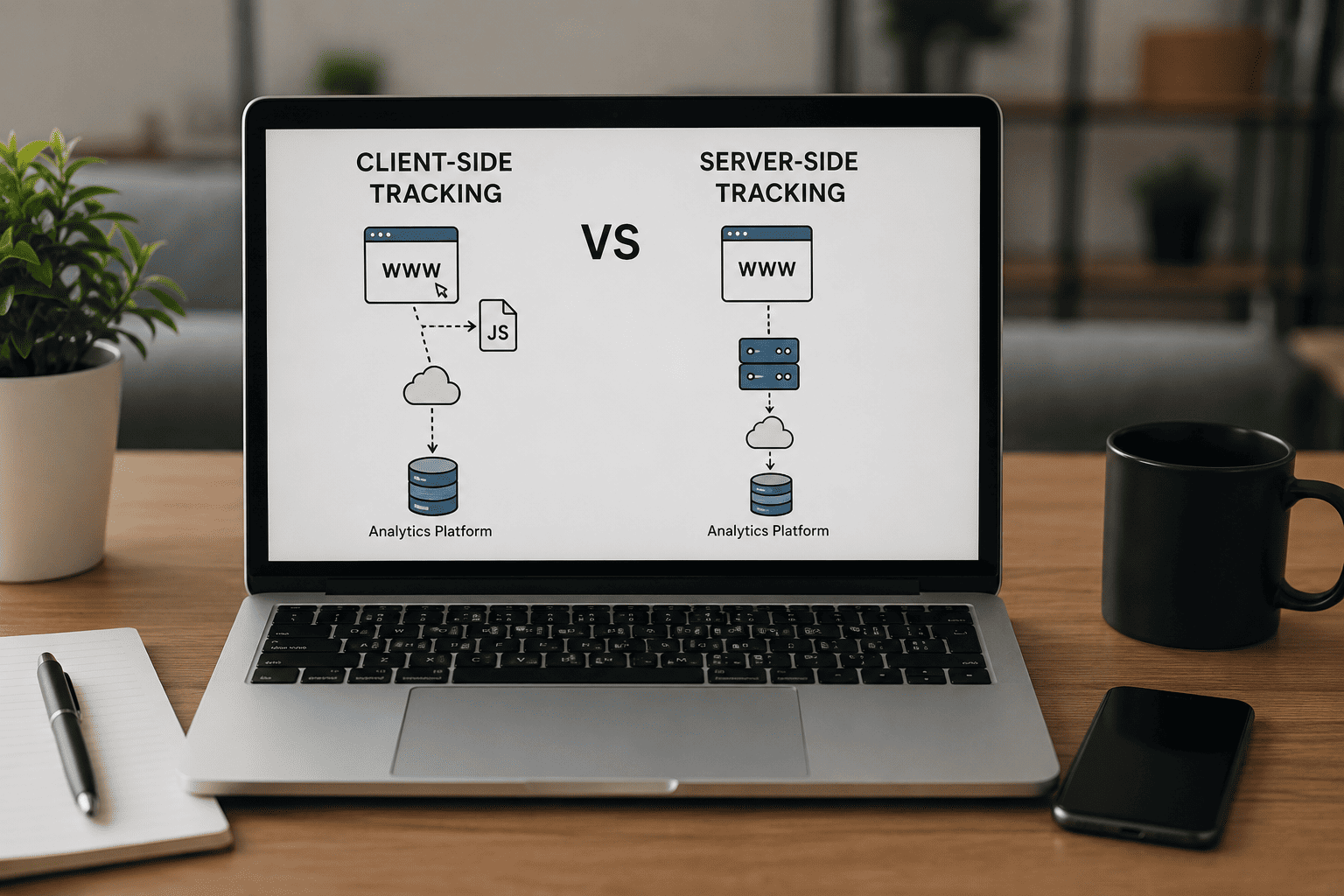
Client-side tracking collects user data directly from a visitor’s web browser using JavaScript tags, tracking pixels, or cookies.
When a visitor loads a webpage, the browser executes tracking scripts that send information directly to analytics or advertising platforms.
Common client-side tracking tools include:
- Google Analytics 4 (Browser Implementation)
- Meta Pixel
- LinkedIn Insight Tag
- Google Ads Conversion Tracking
- Microsoft Clarity
This has been the standard tracking method for years.
How Client-Side Tracking Works
The process is straightforward:
- A visitor opens your website.
- JavaScript tracking code loads in the browser.
- User actions such as clicks, purchases, and page views are recorded.
- Data is sent directly from the browser to analytics platforms.
Although simple, this approach faces growing challenges due to browser privacy features.
Advantages of Client-Side Tracking
Easy to Implement
Most tracking platforms only require adding a JavaScript tag or using Google Tag Manager.
Faster Deployment
Marketing teams can add or modify tracking tags without significant server-side development.
Lower Initial Cost
Businesses can begin tracking quickly without additional infrastructure.
Large Ecosystem
Almost every marketing platform supports browser-based tracking.
Limitations of Client-Side Tracking
Despite its popularity, client-side tracking has become less reliable.
Ad Blockers
Many users install ad blockers that prevent tracking scripts from loading.
Browser Restrictions
Browsers like Safari and Firefox aggressively limit cookies and tracking technologies.
Cookie Consent Issues
Privacy laws require websites to obtain user consent before collecting certain types of data.
Data Loss
Blocked scripts often result in incomplete analytics and inaccurate conversion reporting.
Security Concerns
Tracking scripts run inside the browser, making them more vulnerable to manipulation.
What Is Server-Side Tracking?
Server-side tracking moves the data collection process from the user’s browser to your own server.
Instead of sending information directly to marketing platforms, your website sends data to a secure server. The server then forwards validated information to analytics and advertising tools.
This architecture gives businesses greater control over collected data.
How Server-Side Tracking Works
The workflow typically looks like this:
- User visits your website.
- Browser sends requests to your server.
- The server processes and validates collected data.
- Only necessary information is forwarded to platforms like Google Analytics, Meta, or CRM systems.
This significantly reduces data loss caused by browser restrictions.
Benefits of Server-Side Tracking
Improved Data Accuracy
Server-side tracking captures more reliable events because requests originate from your server instead of relying entirely on browser scripts.
Better Privacy Control
Organizations have greater control over which data is collected, processed, and shared.
Reduced Impact from Ad Blockers
Since much of the processing occurs on your server, more events can be captured compared to traditional browser-only tracking.
Enhanced Website Performance
Fewer client-side scripts reduce browser workload and may improve page loading speed.
Stronger Security
Sensitive business logic and data processing remain on secure servers rather than being exposed in the browser.
Better Attribution
More complete tracking helps improve campaign reporting and marketing attribution.
Challenges of Server-Side Tracking
Although powerful, server-side tracking isn’t perfect.
Higher Setup Complexity
Implementation usually requires developer involvement and server infrastructure.
Additional Costs
Businesses may need cloud hosting or server resources.
Ongoing Maintenance
Servers, APIs, and integrations require regular monitoring.
Technical Expertise
Configuration often involves Google Tag Manager Server Containers, APIs, and cloud services.
Server-Side vs Client-Side Tracking Comparison
| Feature | Client-Side Tracking | Server-Side Tracking |
|---|---|---|
| Data Accuracy | Moderate | High |
| Privacy Control | Limited | Excellent |
| Ad Blocker Resistance | Low | Better |
| Browser Dependency | High | Low |
| Website Performance | Moderate | Better |
| Setup Difficulty | Easy | Advanced |
| Maintenance | Low | Medium |
| Infrastructure Cost | Low | Higher |
| Security | Moderate | High |
| Future Readiness | Moderate | Excellent |
Which Businesses Should Use Client-Side Tracking?
Client-side tracking remains suitable for:
- Small businesses
- Personal blogs
- Startup websites
- Basic analytics implementations
- Companies with limited technical resources
If your reporting needs are simple, browser-based tracking may still be sufficient.
Which Businesses Should Use Server-Side Tracking?
Server-side tracking is ideal for:
- Large eCommerce stores
- SaaS companies
- Enterprise organizations
- B2B marketing teams
- Businesses running multiple advertising platforms
- Companies prioritizing first-party data strategies
- Organizations with strict privacy requirements
These businesses typically benefit from higher-quality analytics and improved conversion measurement.
Can You Use Both Together?
Yes.
Many organizations adopt a hybrid tracking strategy, combining client-side and server-side tracking.
For example:
- Client-side tracking for user interactions and interface events.
- Server-side tracking for purchases, lead submissions, CRM events, and conversions.
This approach improves reliability while maintaining compatibility with existing marketing tools.
Best Practices for Modern Tracking
To build a future-ready tracking strategy:
- Prioritize first-party data collection.
- Minimize unnecessary tracking scripts.
- Implement proper consent management.
- Validate collected events regularly.
- Monitor data quality across analytics platforms.
- Secure sensitive customer information.
- Keep documentation updated for all tracking implementations.
Future of Digital Tracking
Privacy-focused browsers, stricter regulations, and the decline of third-party cookies are reshaping digital analytics.
Server-side tracking is becoming a key component of modern measurement strategies because it offers greater flexibility, stronger privacy controls, and improved data reliability. However, it should be implemented thoughtfully alongside transparent consent practices and clear data governance.
Organizations that invest in modern tracking architectures today will be better prepared for future changes in digital marketing.
Conclusion
Both server-side and client-side tracking have important roles in modern marketing.
Client-side tracking remains easy to deploy and works well for basic analytics. However, browser restrictions and privacy changes continue to reduce its effectiveness.
Server-side tracking provides improved data accuracy, stronger security, greater control, and better long-term scalability. While it requires more technical expertise and infrastructure, it offers significant advantages for businesses that rely on accurate marketing data.
Rather than viewing them as competing solutions, many organizations achieve the best results by combining both approaches into a hybrid tracking strategy that balances performance, privacy, and measurement accuracy.
Frequently Asked Questions (FAQs)
1. What is the main difference between server-side and client-side tracking?
Client-side tracking collects data directly from the user’s browser, while server-side tracking processes data through your server before sending it to analytics or advertising platforms.
2. Is server-side tracking more accurate?
Yes. Server-side tracking generally reduces data loss caused by browser restrictions and ad blockers, leading to more reliable analytics.
3. Does server-side tracking replace cookies?
Not entirely. It reduces reliance on browser cookies but may still use first-party cookies depending on the implementation.
4. Is server-side tracking better for SEO?
Tracking itself does not directly improve SEO, but more accurate analytics help marketers make informed decisions that can enhance website performance and user experience.