









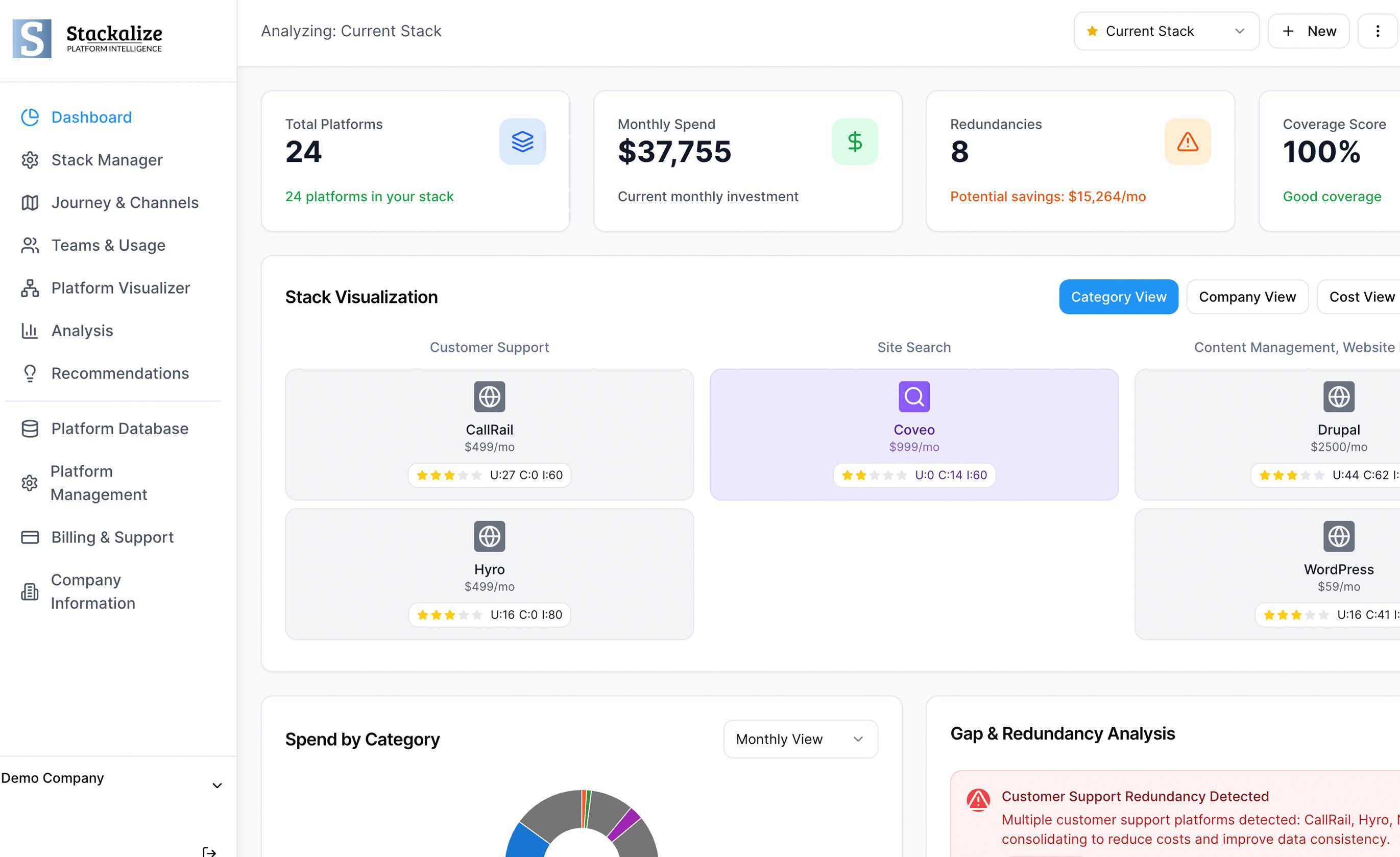
Marketing technology has become an essential part of how businesses attract prospects, manage customer relationships, automate campaigns, and measure performance. As marketing teams grow, they often adopt new platforms to solve specific problems. Over time, however, these tools can introduce an unexpected challenge: several platforms may offer the same features.
For example, a marketing team might use one platform to automate email campaigns, another to manage customer journeys, and a CRM with its own email automation capabilities. Each tool may serve a purpose, but overlapping features can make the technology stack more expensive and difficult to manage.
Identifying redundant features across your MarTech stack helps businesses understand what they already have, where capabilities overlap, and which tools provide genuine value. The goal is not simply to reduce the number of platforms. It is to build a more efficient marketing technology environment that supports business objectives.
What Are Redundant Features in a MarTech Stack?
Redundant features are capabilities available in multiple marketing technology platforms that perform similar or identical tasks.
These overlaps can develop gradually. A business may purchase a new customer data platform to improve audience segmentation without realizing that its existing marketing automation software already provides similar functionality.
Common examples include:
- Email automation: Multiple platforms support automated emails, follow-up sequences, and campaign scheduling.
- Customer analytics: Different tools track website activity, conversions, engagement, and campaign performance.
- Lead scoring: A CRM and a marketing automation platform both assign scores to potential customers.
- Audience segmentation: Several systems divide customers into groups based on behavior, interests, or demographic information.
- Reporting dashboards: Marketing platforms generate similar campaign reports, resulting in duplicate work.
- Landing page creation: Email marketing, CRM, and campaign management tools may all include landing page builders.
Having overlapping features does not automatically mean a tool is unnecessary. Some platforms may offer specialized capabilities, better integrations, or more accurate reporting. The important step is determining whether the overlap creates measurable value or unnecessary complexity.
Why Do Redundant Features Develop?
1. Marketing Teams Purchase Tools Independently
Different departments often select software to solve their immediate needs. The email marketing team might purchase an automation platform, while the demand generation team selects another tool for lead nurturing.
Without coordination, these decisions can create overlapping capabilities across the organization.
2. Existing Features Go Unnoticed
Marketing platforms regularly introduce new features. A company may continue paying for a separate application even after its existing software adds a comparable capability.
This often happens when teams do not regularly review product updates or maintain an accurate inventory of available features.
3. Business Requirements Change
A platform that was useful when a business had a small marketing team may no longer be necessary after the company adopts a more comprehensive CRM or marketing automation system.
As business requirements evolve, the technology stack should evolve with them.
4. Teams Prefer Familiar Tools
Employees may continue using a familiar application even when another platform already provides the same functionality. This can happen because of established workflows, training requirements, or concerns about changing systems.
Understanding these preferences is important before removing or consolidating any tool.
How to Identify Redundant Features Across Your MarTech Stack
Step 1: Create a Complete Inventory of Your Marketing Tools
Start by listing every platform currently used by your marketing, sales, and customer engagement teams.
Include major systems such as CRMs and marketing automation platforms, along with smaller applications for analytics, social media management, lead generation, and reporting.
For each tool, document:
- Platform name and primary purpose
- Teams and users who depend on it
- Features currently in use
- Monthly or annual subscription cost
- Integrations with other systems
- Contract renewal date
- Business processes supported by the platform
This inventory provides a clear picture of your existing technology environment. It can also reveal tools that are still being paid for but are rarely used.
Step 2: Map Features Instead of Comparing Software Names
A tool-by-tool comparison may not reveal the full extent of duplication. Two platforms can have different primary purposes while still offering similar features.
Instead, compare their capabilities directly.
For example, imagine a business uses a CRM, an email marketing platform, and a marketing automation solution. All three may support contact management, audience segmentation, and performance reporting.
Create a feature comparison table to identify these overlaps.
| Marketing capability | CRM | Email platform | Automation platform |
|---|---|---|---|
| Contact management | Available | Available | Available |
| Email campaigns | Basic | Advanced | Advanced |
| Lead scoring | Available | Limited | Available |
| Workflow automation | Basic | Available | Advanced |
| Campaign reporting | Available | Available | Available |
This is an illustrative example, not a comparison of specific products. Actual capabilities vary by platform and subscription plan.
The table helps teams identify where several applications perform similar tasks and where one platform offers more advanced functionality.
Step 3: Check Which Features Teams Actually Use
A feature appearing in a software plan does not mean employees use it.
Review product usage reports, user activity, campaign histories, and team feedback to understand how each capability contributes to daily operations.
Ask questions such as:
- Is the feature used regularly?
- Does it support an important marketing process?
- Are employees using another platform for the same task?
- Does the feature improve productivity or campaign performance?
- Would removing it interrupt an existing workflow?
For instance, two tools might provide landing page creation, but the marketing team may actively use only one. The second feature could be unnecessary unless it supports a specific requirement that the primary platform cannot meet.
Step 4: Evaluate the Quality of Each Capability
Not all overlapping features deliver the same results.
One platform may offer basic lead scoring, while another uses a more sophisticated model that incorporates behavioral and account-level information. Although both systems perform lead scoring, their outputs may serve different business needs.
Evaluate each capability according to its functionality, reliability, integration options, reporting quality, and ease of use.
Consider whether a feature supports a specialized requirement that cannot be replaced without sacrificing performance.
This prevents businesses from removing useful tools simply because another platform offers a similarly named feature.
Step 5: Calculate the Total Cost of Overlapping Features
Subscription prices are only one part of the cost of maintaining a marketing technology stack.
Businesses should also consider implementation expenses, integration maintenance, training, support, and the time employees spend managing multiple systems.
Suppose a company pays for three platforms that offer overlapping reporting capabilities. Consolidating reporting into one suitable platform might reduce subscription expenses and eliminate repetitive manual work.
However, the potential savings should be calculated against migration costs, contract termination fees, additional licenses, and any new implementation requirements.
A feature overlap represents a potential cost-saving opportunity, not proof that immediate consolidation will be financially beneficial.
Step 6: Review Integrations and Data Flows
Redundant features can create additional data management challenges when several systems collect, modify, or synchronize the same information.
For example, multiple platforms might maintain separate contact records, campaign engagement histories, or lead scores. Differences between these records can make it difficult for marketing and sales teams to determine which information is reliable.
Map how information moves between platforms. Identify duplicate records, conflicting updates, unnecessary integrations, and manual data transfers.
Before removing a tool, confirm which systems depend on it and determine how existing data and workflows will be maintained.
Step 7: Gather Feedback From the Teams Using the Tools
Usage statistics provide valuable evidence, but they do not always explain why a feature matters.
Speak with marketing, sales, operations, and analytics teams to understand their requirements. A capability that appears redundant to one department might support a critical workflow for another.
Ask users which features save time, which tasks require multiple applications, and where they experience unnecessary complexity.
Combining employee feedback with usage data helps organizations make decisions based on actual working conditions rather than assumptions.
How to Decide Whether to Keep, Consolidate, or Remove a Feature
Once the review is complete, group overlapping capabilities into three categories.
Keep
Retain features that provide specialized functionality, support essential workflows, or deliver measurable business value.
Consolidate
Combine capabilities when one platform can meet the same requirements without reducing performance, security, reporting quality, or usability.
Remove
Consider removing unused or unnecessary capabilities when they no longer support business requirements and their removal will not disrupt critical operations.
Document the reason behind each decision. This creates a record that helps stakeholders understand why a platform or feature was retained, consolidated, or discontinued.
Best Practices for Preventing Feature Redundancy
Identifying overlapping capabilities is only the first step. Businesses also need a process for preventing unnecessary duplication in the future.
Establish clear ownership. Assign responsibility for managing the MarTech stack and reviewing new software requests.
Review the stack regularly. Conduct feature and usage reviews before major contract renewals or significant technology changes.
Evaluate existing capabilities before buying. Require teams to check whether their current platforms can meet new requirements before purchasing additional software.
Document business requirements. Define the problem a proposed tool should solve and the capabilities needed to address it.
Monitor adoption and value. Review usage, operational efficiency, and business outcomes rather than relying only on the number of available features.
Involve relevant stakeholders. Include marketing, sales, IT, security, and finance when evaluating changes that affect multiple departments.
These practices help organizations maintain a MarTech stack that remains aligned with changing business needs.
The Business Benefits of Reducing Feature Redundancy
A well-managed MarTech stack can improve more than software spending.
When teams know which platform is responsible for each marketing function, they can spend less time switching between applications and reconciling conflicting reports.
Reducing unnecessary overlap can also simplify employee training, improve accountability, and make it easier to identify the source of data problems.
More importantly, a clear view of existing capabilities helps marketing leaders make better investment decisions. Instead of purchasing another tool whenever a new requirement appears, they can evaluate whether existing technology can address the problem.
These benefits depend on careful implementation. Removing a platform without assessing its integrations, data, and specialized features can create new operational problems.
Conclusion
Identifying redundant features across your MarTech stack requires a structured review of software capabilities, actual usage, costs, integrations, and business requirements.
By building a technology inventory, mapping overlapping features, consulting employees, and evaluating the value of each capability, marketing teams can make more informed decisions about what to retain, consolidate, or remove.
The objective is not to operate with the fewest possible tools. It is to ensure that every platform has a clear purpose and contributes meaningfully to marketing performance.
A regularly reviewed MarTech stack gives organizations a stronger foundation for efficient workflows, reliable data, and more effective technology investments.
Frequently Asked Questions
1. What are redundant features in a MarTech stack?
Redundant features are capabilities available across multiple marketing platforms that perform similar tasks, such as email automation, lead scoring, audience segmentation, or campaign reporting.
2. How can businesses identify overlapping marketing tools?
Businesses can create a software inventory, compare platform capabilities, analyze feature usage, review costs, and gather feedback from the teams using the tools.
3. Should businesses remove every tool with duplicate features?
No. Overlapping features may offer different functionality or support specialized workflows. Evaluate performance, integration requirements, costs, and business value before removing a tool.
4. How often should a MarTech stack be audited?
A review every six to twelve months is a useful starting point. Businesses should also reassess their stack before software renewals, major purchases, or changes in marketing requirements.